WriteText.ai 4.5 is here: expanded alt text coverage, default templates, and more. See what's new.

WriteText.ai 4.5 is here: expanded alt text coverage, default templates, and more. See what's new.
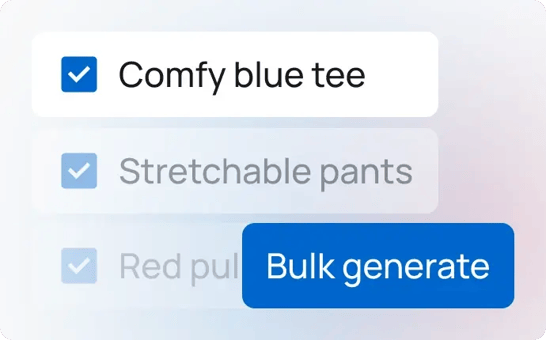
Bulk content generation is the process of producing SEO-optimized content for multiple products at the same time using a shared set of settings. Rather than opening each product individually, you select a group of products or categories, configure your tone, style, audience, and keyword settings once, and generate content for all of them in a single run.
WriteText.ai Bulk applies this across every content type a product page needs, from the main product description to the meta title, meta description, Open Graph text, short description, and image alt text. The same configuration runs across every selected product or category, producing consistent, SEO-ready output without manual input per item.
WriteText.ai Bulk covers the full content workflow in one place. From a single session, you can run four operations across an entire product or category batch.
Keyword analysis runs across every item in the batch automatically. WriteText.ai identifies relevant keywords for each item and builds cluster-based keyword optimization pipelines, so every listing enters generation already targeted to the right search terms. This replaces the manual keyword research step that would otherwise be needed per item.
Content generation runs across all selected items using your configured tone, style, target audience, template, and product data settings. Each item gets its own unique, accurate output — product descriptions, meta titles, meta descriptions, Open Graph text, short descriptions, and image alt text — all produced in one run rather than one at a time.
Once content is generated, bulk transfer publishes it directly to your store. The generated content goes from WriteText.ai to your WooCommerce, Magento, or Shopify backend in one step, with no manual copying or pasting required.
Keyword analysis, content generation, and transfer can all be triggered together in a single click. Full automation in Bulk runs the entire workflow end-to-end for a batch, requiring no input between steps. It is the fastest path from an unwritten catalog to live, optimized product pages.
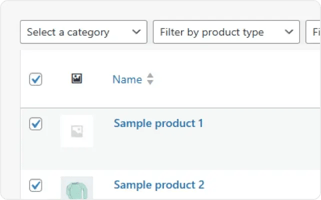
Choose the products or categories you want to generate content for. WriteText.ai lets you filter by category, status, or other criteria so you can build a focused batch before generation starts.
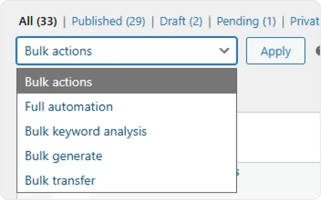
Select which operation you want to run: bulk keyword analysis, bulk generate, bulk transfer, or full automation, which runs all three in sequence.
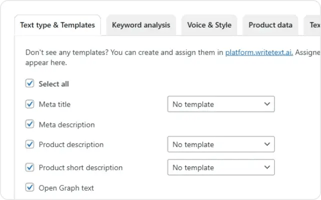
A settings panel opens where you can configure the details of the selected action. The available options vary depending on which bulk action you chose.
Confirm your settings and run the action. WriteText.ai processes every item in the batch using the shared configuration, with no input required between steps.
For best results, group items that use the same template into the same batch, for example, products from the same category that share the same content structure and settings. Because every item in a batch shares one configuration, keeping templates and product types consistent within a batch produces more accurate, reliable output.
Bulk generation replaces the item-by-item approach. Select your products or categories, configure your settings once, and WriteText.ai generates descriptions, meta titles, meta descriptions, Open Graph text, short descriptions, and image alt text for every item in the batch.
Bulk transfer sends generated content directly to your WooCommerce, Magento, or Shopify store. Nothing is copied manually. The content goes from generation to live product page in one step.
Bulk uses the same settings you have already tested and confirmed in Single mode. The tone, style, template, and keyword configuration that worked for individual items are applied consistently across every item in the batch.
Because every item in a batch shares the same configuration, the output is consistent in tone, structure, and style across hundreds of products and categories.
The full automation option in Bulk triggers keyword analysis, generation, and transfer together. The entire workflow completes without input between steps, freeing up time for other work while the catalog is being processed.
WriteText.ai Bulk generates product descriptions, short descriptions, meta titles, meta descriptions, Open Graph text, and image alt text. All content types are generated in the same run using the same configuration.
Yes. Both modes use the same generation process and support the same settings: brand voice, tone, style, audience, template, product data, keyword analysis, web research, and image analysis. The output quality is the same. The difference is that Single mode lets you add a product-specific prompt and review settings per item, while Bulk applies one shared configuration across the whole batch. For a full comparison, see what is the difference between WriteText.ai Single and WriteText.ai Bulk.
The number of products you can process in a single session depends on your platform. Shopify and Magento supports up to 500 products per run; WooCommerce supports up to 5,000 products per run. Server resources also affect how many products you can process without slowdown, starting with 50 and scaling up is a good approach. For full details, see how many products can I generate in one go using bulk generation.
Each Bulk session uses one shared configuration. If you need different settings for different product types, for example, a different tone for a technical product line versus a lifestyle range, run them as separate bulk sessions, each with its own configuration. The filter tools in WriteText.ai let you select specific product groups to keep sessions organized.
The recommended approach is to test your settings in Single mode first. Select a few products from the same category, try different tone and template combinations, and confirm the output matches your standard. Once you have a configuration you are happy with, apply it in Bulk to process the rest of the catalog. This avoids using credits on a large batch before the settings have been verified.
Yes. Both Single and Bulk modes are available on every WriteText.ai plan tier. You can switch between them at any time depending on what your current task requires. See pricing tiers for a full breakdown of what each plan includes.
Yes. Keyword analysis, web research, and image analysis are all available in Bulk mode and apply across every item in the batch. Enabling these features increases the accuracy and detail of the generated content, particularly for products with sparse backend data. Note that web research and image analysis consume additional credits per item.