WriteText.ai 4.5 is here: expanded alt text coverage, default templates, and more. See what's new.

WriteText.ai 4.5 is here: expanded alt text coverage, default templates, and more. See what's new.

Keyword analysis for SEO, also known as keyword research, is the process of finding and evaluating the search terms people use when they look for products, services, or information in search engines like Google.
For example, someone looking for a new laptop might search for “best laptops,” “buy laptop online,” or “affordable laptops.”
Keywords help search engines understand what your pages are about. When your product and category text uses the keywords shoppers search for, your pages are more likely to show up in search results, which brings more organic traffic and more sales. Because search behavior changes, keyword analysis works best as an ongoing process, not a one-time task.
Keyword analysis is built into WriteText.ai, alongside attribute enrichment, text generation, and publishing for your WooCommerce, Magento, and Shopify webshop. It doesn’t just give you a list of keywords. It decides which keywords each page should target now and next, and uses them when you generate text.
With WriteText.ai, you get:
With ongoing keyword analysis, your SEO keeps improving as your pages rank, instead of stopping after the first round of research.
Start with keywords each page can realistically rank for, and build toward more competitive ones.
Let WriteText.ai flag or regenerate your text as rankings change, so your pages keep up with search demand.
Analyze keywords for many products and categories at once, instead of researching every page by hand.
Choose keywords based on search volume, competition, search intent, and traffic potential.
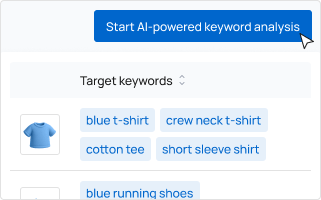
Open Keyword optimization in WriteText.ai, select the products or categories you want to optimize, and click “Start AI-powered keyword analysis.” Choose your search intent and triggers, and WriteText.ai runs a comprehensive keyword research process.
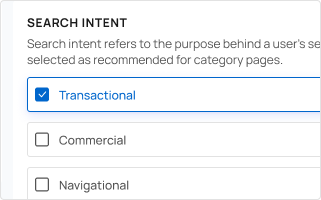
Before the analysis starts, choose the search intent WriteText.ai should focus on:
For most ecommerce pages, transactional and commercial keywords are the most valuable.
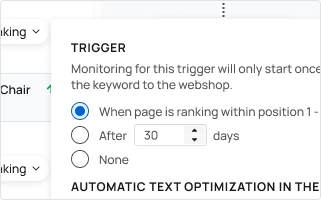
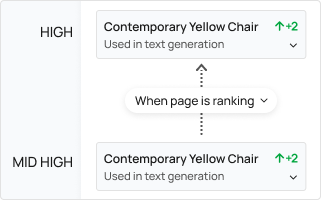
You decide when each page moves to its next keywords.
Move a page forward when it ranks within the positions you set in search results, or after a set number of days. You can set a different trigger for each step of the pipeline, or turn a step off.
Monitoring starts once you send the optimized text with the keyword to your webshop. You can also exclude terms with negative keywords, so they’re left out of keyword analysis, generated text, or both.
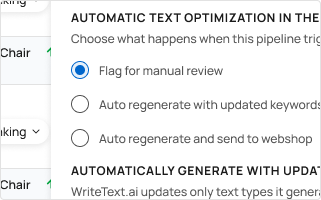
When a trigger is met, WriteText.ai does what you choose:
Keyword analysis is one part of WriteText.ai. Enrich your product attributes, generate text with your templates and brand voice, and send it to your webshop and sales channels, all from one platform. See all features.
Your target keywords guide the SEO-optimized text you generate, and the results also appear in your SEO, GEO, and AEO views.
Keyword analysis combines WriteText.ai’s own technology with research data from a third-party partner, and always uses WriteText.ai units, even if you bring your own API key for other tasks.
WriteText.ai combines its own technology with research data from a third-party partner to assess each keyword’s search volume and competition.
With a ranking trigger, the page stays on its current keywords until it ranks within the positions you set. If you’d rather move on after a while, use a time-based trigger to switch to the next keywords after a set number of days.
No. Keyword analysis always uses WriteText.ai units, even when your own API key is enabled for other tasks.
Yes. The keyword cannibalization report shows keywords for which more than one page in your webshop appears in search results. Compare the pages and their search positions, decide which page should be the main target, and mark the keyword as processed once you’ve reviewed it.