
WriteText.ai uses your platform’s REST API (a standard way for your website to let approved tools exchange information with it) to run bulk actions. If your site limits or blocks REST API communication, WriteText.ai cannot complete bulk actions.
(Single-product actions will continue to work normally, because they use a different communication method.)
This issue does not mean anything is broken; it simply means your website is not currently allowing the type of communication that bulk actions require.
Troubleshooting steps
Follow the instructions below based on whether you are using WooCommerce or Magento.
If you’re using WooCommerce
WriteText.ai may be unable to communicate through the WooCommerce REST API because:
- A plugin is limiting REST API requests
Some plugins can restrict or filter external API calls. Common examples include:- Wordfence
- Sucuri
- All In One WP Security
- iThemes Security
Check their settings for REST API, external requests, or blocking rules. - Hosting or CDN rules are filtering requests
Your hosting provider, CDN, or server firewall (e.g., Cloudflare, ModSecurity, LiteSpeed/Nginx rules) may block automated external requests. - IP addresses may need to be allowed
If your hosting environment filters traffic by IP address, you may need to allow or "whitelist" WriteText.ai. The IP address list is provided further below.
If you’re using Magento
Magento uses an OAuth-based REST API, and several conditions can affect communication:
- The WriteText.ai integration is disabled
Go to: System → Extensions → Integrations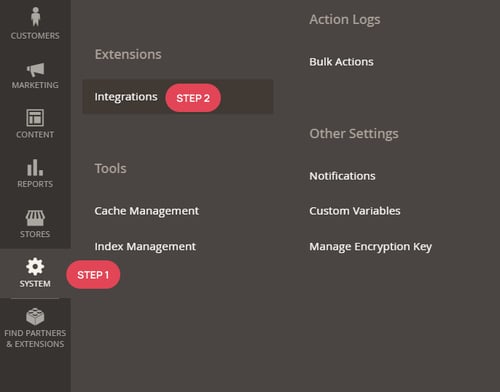
Ensure that writetextai_integration is active and WriteText AI Rest API is selected.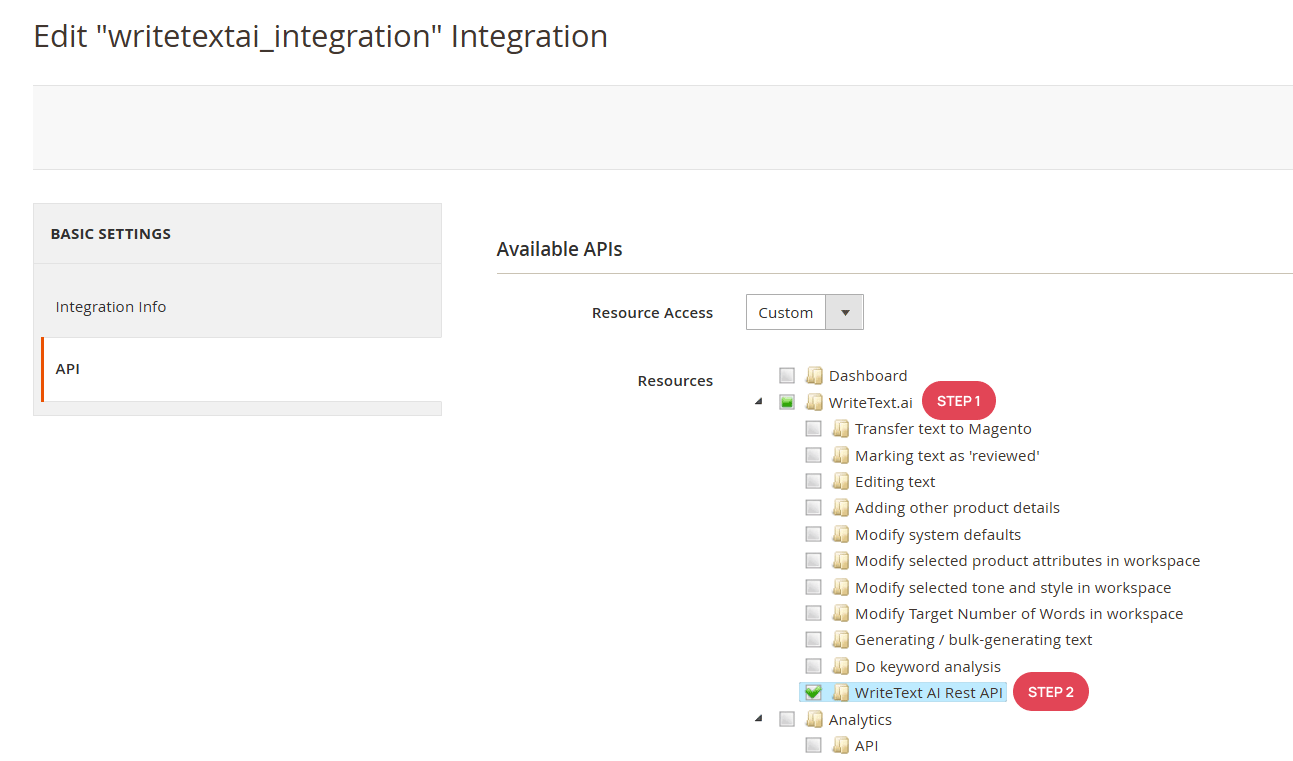
If it still does not work, delete the writetextai_integration and refresh the WriteText.ai product grid. A new writetextai_integration will be created automatically after the page reloads.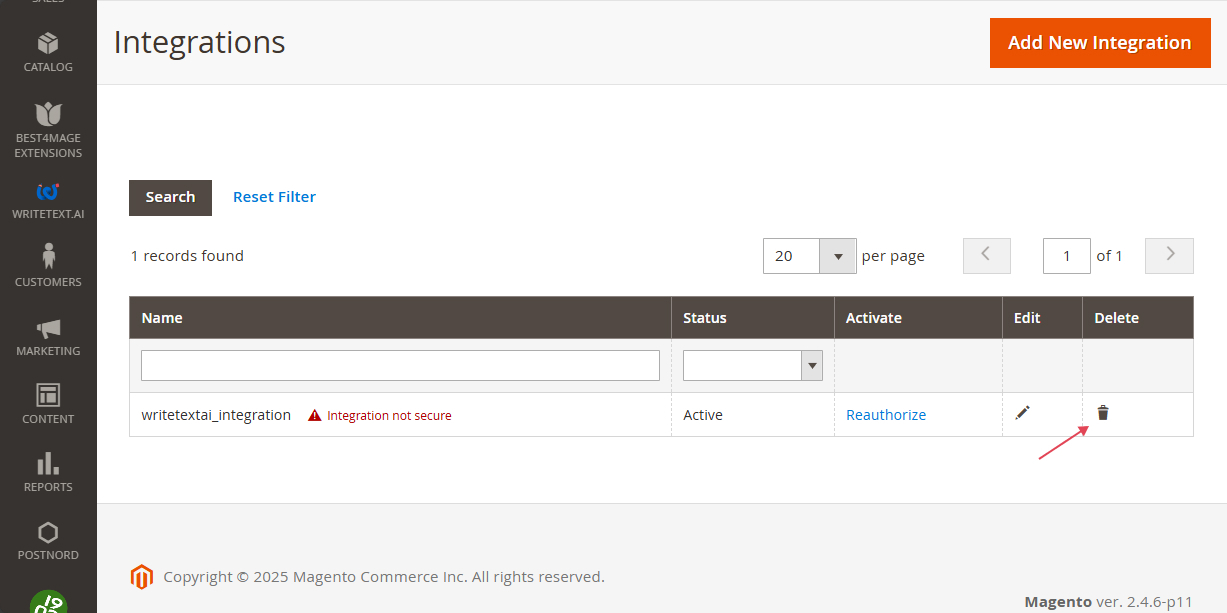
- A module, firewall rule, or server setting is blocking REST API routes
This may include:- Custom modules modifying API routes
- Hosting or CDN rules blocking API endpoints
- IP addresses may need to be allowed
If your hosting environment filters requests by IP, WriteText.ai may need to be added to the allowlist or whitelist.
WriteText.ai IP address list
Use this list if your hosting or firewall environment filters traffic by IP address.
This list may be updated from time to time.
20.197.96.0/22
20.197.100.0/24
20.238.232.0/21
20.248.232.0/21
20.123.230.0/23
20.66.120.0/23
20.245.86.0/23
20.11.80.0/23
20.213.68.0/22
20.212.64.5/32
57.155.24.37/32
20.103.143.129/32
20.105.216.41/32
20.31.33.43/32
20.31.35.218/32
20.31.38.252/32
20.245.83.255/32
20.245.111.212/32
20.245.172.211/32
20.245.215.26/32
20.253.255.206/32
40.112.243.119/32
20.211.64.19/32
About CIDR notation - Most modern systems accept IP addresses in CIDR notation (such as
/22, /23, /32). Only older or legacy systems require alternative formats like subnet masks or IP ranges. If needed, your hosting provider can convert the notation.If you still cannot run bulk actions
If the issue persists after checking the steps above:
- Your developer or hosting provider can identify which rule is blocking REST API communication
- Or you can create a support ticket, and our team will help troubleshoot the issue with you.
CONTENTS