WriteText.ai 4.5 is here: expanded alt text coverage, default templates, and more. See what's new.

WriteText.ai 4.5 is here: expanded alt text coverage, default templates, and more. See what's new.
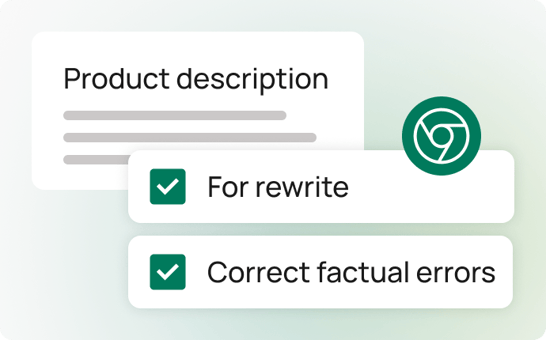
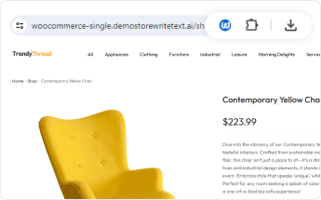
The WriteText.ai Chrome extension is a companion tool for its Shopify app that enhances your content review process. It lets you browse your live Shopify product pages and make direct annotations or comments on any text that needs to be rewritten or fact-checked.
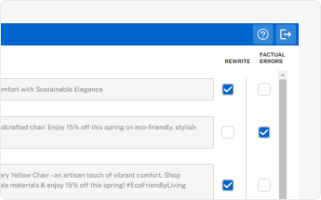
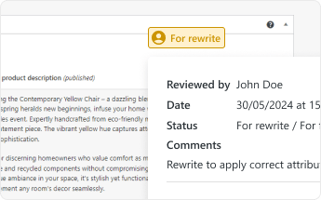
These notes are instantly synced with the WriteText.ai dashboard inside Shopify, providing a collaborative space for content writers and reviewers to perfect your store's product descriptions and other content. Whether you’re using Shopify Chrome extensions for content or SEO management, this tool ensures full synchronization and control.
Content accuracy and consistency are crucial for any Shopify store. With the WriteText.ai Shopify Chrome extension, you can ensure that all product pages meet your standards without the hassle of back-and-forth communication.
By allowing real-time annotations on live pages, this Chrome extension for Shopify helps you catch errors, highlight areas for improvement, and ensure that your content aligns with your brand’s voice and style.
Instantly reflect your annotations and feedback in the WriteText.ai dashboard, fostering seamless collaboration between content writers and reviewers.
Quickly identify and correct mistakes or outdated information on your Shopify product pages.
Reduce revision time by marking changes directly on live pages using your Shopify Chrome extension — one of the most efficient Chrome extensions Shopify teams can use for collaboration.
Keep all team members on the same page with clear, visible annotations and comments that are easy to follow and act upon.

While the companion Shopify Chrome extension is a standout feature, WriteText.ai offers many other tools to enhance your Shopify store. Experience convenience and speed in ecommerce copywriting with WriteText.ai’s suite of features from audience targeting, custom tones and styles, product description generator, to keyword analysis and more. See full list of features here.
By combining WriteText.ai’s AI-powered generation tools with the Chrome extension Shopify merchants rely on, you can ensure every update remains accurate, on-brand, and ready to convert.
The WriteText.ai Chrome extension for Shopify is the ultimate tool for ensuring your store's content is always accurate, engaging, and up to date. By simplifying the content review process and enhancing collaboration between team members, this Shopify Chrome extension empowers you to maintain the highest standards for your Shopify store.
Yes — the Chrome extension is a companion tool to the WriteText.ai app for Shopify. It requires an active WriteText.ai account and the Shopify app to be installed. The extension connects to your WriteText.ai dashboard inside Shopify, so annotations you make on live product pages are synced there for your team to act on. The extension cannot be used independently without the WriteText.ai Shopify app.
The Chrome extension reads live product pages as they appear in the browser, regardless of which Shopify theme you are using. It works by selecting visible text on the page for annotation, so as long as your product content is rendered as readable text on the storefront — which it will be in any standard or custom Shopify theme — the extension can annotate it. There is no theme-specific configuration required and no conflict with Liquid-rendered content.
The Chrome extension is designed specifically for this kind of brand review workflow. Your brand manager browses the live Shopify storefront, selects any text that needs adjustment, and leaves a note flagging it for rewriting or fact-checking — directly on the live page. Those annotations sync instantly to the WriteText.ai dashboard inside Shopify, where the content writer sees the feedback and can regenerate or edit the content accordingly. The updated content is then published to Shopify with one click. The full cycle — from review to revision to publishing — stays within the WriteText.ai workflow without any external tools or manual handoffs.
Multiple people can use the Chrome extension at the same time. WriteText.ai supports multi‑user collaboration, allowing your team members to annotate different pages concurrently, with all annotations syncing to the same WriteText.ai dashboard.
The Chrome extension makes no changes to your live Shopify store. Annotations exist only within your WriteText.ai account and are not visible to customers browsing your store. The only changes that appear on the live storefront are those explicitly published by your content team through the WriteText.ai Shopify app after reviewing and approving updated content. The extension is purely a review and feedback tool — nothing is modified on the storefront until a writer chooses to publish.
The Chrome extension is a companion feature to WriteText.ai and is not priced as a separate add‑on. It works as part of the WriteText.ai platform when connected to an active account. To learn more about plan inclusions, please refer to our pricing page.