
People Also Ask (PAA) is a feature built into Google Search. When you do a search on Google or Bing, a box appears in the search results showing a set of related questions that other users have searched for on the same topic. These questions give users a starting point for exploring a subject further without having to type a new search.
The People Also Ask block in WriteText.ai lets you bring these search-sourced questions directly into your product and category pages. WriteText.ai retrieves the PAA questions available for each product based on its keyword data and generates a focused answer for each one within your content.
Unlike the FAQ block, which generates a set of questions together in one section, each PAA block addresses one question independently. This gives you more control over where each question and answer appears within your template. It helps align your product pages with SEO, GEO, and AEO best practices. The FAQ block can also draw from PAA data when generating questions, so if you prefer a consolidated Q&A section, the questions it produces can reflect the same search-sourced data rather than being generated from product information alone.
PAA blocks require keyword analysis to have been run for the product first. If no PAA data is available for a product, the block is skipped during generation.
Where can PAA blocks be used?
PAA blocks are available in the following template types:
-
Product description
-
Product short description
-
Category description
How do I add a PAA block to a template?
To add a People Also Ask block to a template:
-
Navigate to Templates in your WriteText.ai platform.
-
Open the template you want to edit (product description, product short description, or category description).
-
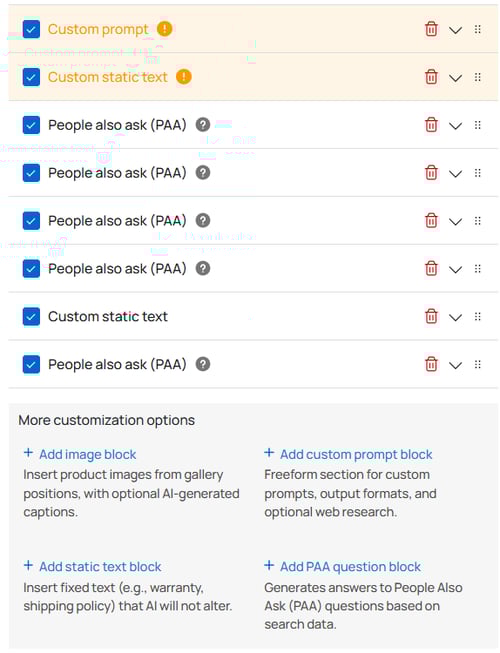
Scroll to the bottom of the template and select Add PAA question block.
-
Drag the block to your desired position.
-
Once added, the block appears in your template and can be configured using the settings described below.
How do I configure a PAA block?
Each PAA block has a heading section and a content section. The heading section lets you set the heading level for the question (H2 through H6). The content section controls how the answer is formatted and generated.
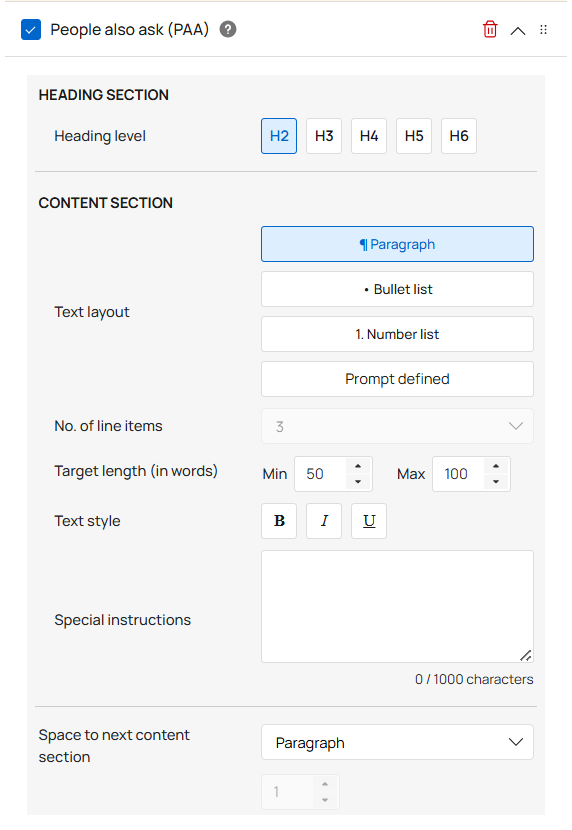
The available content settings are text layout (paragraph, bullet list, number list, or prompt defined), number of line items for list layouts, target word count range, text style, and spacing to the next section.
The Special instructions field lets you add more specific guidance to shape how the answer is written. For examples of how to use special instructions effectively, see Using Special Instructions and Custom Prompts in WriteText.ai.
How many PAA blocks can I add?
You can add up to 10 PAA blocks per template, but the actual number of blocks that produce content depends on how many PAA questions Google surfaces for the product.
The number of questions available for any given product varies: some products with broad search interest may have many PAA questions associated with them, while niche or low-volume products may have very few. WriteText.ai draws from this available pool when generating content for PAA blocks. If a product has PAA data for only three questions, only three blocks will produce output.
This is why running keyword analysis before generating content matters. Without keyword analysis, WriteText.ai has no PAA data to work from, and no PAA blocks will produce output regardless of how many are in the template.
Why PAA blocks matter for AEO
PAA blocks also connect directly to answer engine optimization. When your product pages include focused answers to the questions real users are searching for, they may be more likely to be surfaced in answer-based results, whether in Google's PAA boxes, featured snippets, or AI-generated overviews. Answering the questions people are already asking is what AEO is built around, and PAA blocks give you a direct way to do that at the product page level.
As noted above, the FAQ block can apply the same principle in a single consolidated section when PAA data is available as its question source. For AEO purposes, this means the questions in your FAQ are not just relevant to the product, but also grounded in actual search behavior, which is what answer engines look for when selecting content to surface as a direct response.
To learn more about how People Also Ask data fits into an answer engine optimization strategy, see People Also Ask Blocks: An AEO Guide for Ecommerce.