
WriteText.ai automates keyword optimization for ecommerce product pages. This guide explains how the system works, what it handles automatically, and where you can provide input.
What is keyword optimization?
Keyword optimization is a key aspect of on-page SEO. It's the process of choosing the best keywords for your product page to improve its visibility in search results. It's not just about picking high-traffic (or high "search volume") words—it's about finding terms your audience is searching for, that are achievable for your page to rank for, and that align with your goals.
WriteText.ai handles this process with advanced keyword optimization techniques, combining keyword analysis, ranking data, and competitor insights to deliver continuously improving results. This guide helps you understand how automation simplifies keyword research for SEO and keeps your strategy evolving over time.
The keyword optimization pipeline
WriteText.ai introduces the keyword optimization pipeline—a structured system where instead of focusing on all potential keywords at once, it organizes and prioritizes keywords to ensure your efforts are both strategic and effective.
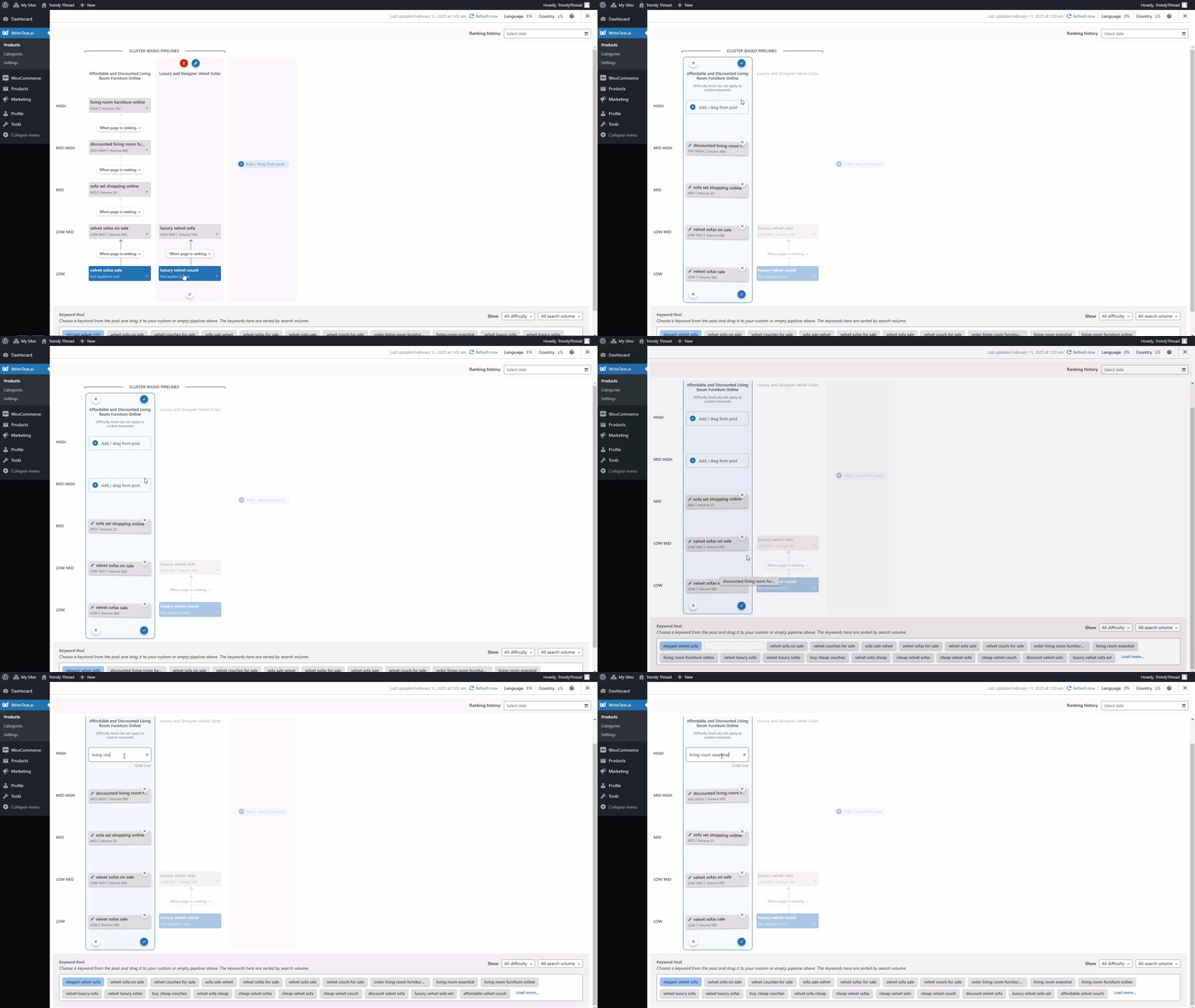
Using advanced keyword optimization, here's a quick overview on how it works:
- Start with low-difficulty keywords. At the beginning (bottom) of the pipeline, you'll see keywords with low difficulty and reasonable search volume. These terms are easier to rank for and help your page gain visibility quickly.
- Progress to more competitive terms. Once your content begins to rank for initial keywords and your site builds authority over time, the pipeline advances to keywords with higher difficulty. These are more competitive but generally bring greater traffic and conversion potential.
- Automatic keyword advancements. You decide how the page moves through the pipeline. Advancements can be triggered based on time intervals (e.g., after 30 days) or ranking milestones (e.g., when your page enters the top 20 of the SERP or search engine results page).
Learn more about the keyword optimization pipeline on our blog.
WriteText.ai keyword optimization
WriteText.ai handles the following as part of the keyword optimization process:
Finds the right keywords
The system analyzes your product name, attributes, and featured image to find high-potential keywords relevant to your product, providing a starting point for keyword research that helps identify and prioritize terms that drive visibility.
Learns from the competition
By analyzing top-ranking competitors, WriteText.ai uncovers keyword opportunities you can use to outperform them.
Keeps your content optimized
The keyword optimization pipeline helps your pages progress logically, starting with easier wins and building up to tougher targets.
Updates content automatically
Your product descriptions, meta tags, and more evolve with your rankings—so your content stays current as your keyword targets change.
WriteText.ai Bulk and Single: Two modes for every need
WriteText.ai gives you the flexibility to handle SEO the way that works best for your store. Whether you're focusing on one product or managing hundreds or thousands, you can choose between Single and Bulk modes. Both modes use the same advanced keyword optimization explained throughout this guide, but each is tailored to different workflows.
WriteText.ai Single: Precision for individual products
SSingle mode is designed for optimizing one product at a time. Whether it's a flagship product, a seasonal promotion, or a high-priority item, Single mode lets you fine-tune every detail.
- Full control: Edit seed keywords, adjust clusters, and customize the optimization pipeline to match your goals.
- Tailored updates: Choose how and when your content evolves, with updates based on time or ranking triggers.
- Detailed tracking: Monitor each product's performance individually, with real-time keyword and SERP insights
When to use Single mode: Ideal for key products where you want to maximize visibility and fine-tune SEO for better conversions.
WriteText.ai Bulk: Efficiency for large catalogs
Bulk mode is built for scale. If you're managing an extensive inventory, Bulk mode automates the process, letting you optimize multiple products at once with consistent results.
- Batch processing: Generate keyword-optimized content for 10, 50, or even up to 500 products at a time.
- Automated rules: Apply global settings and triggers across the batch for seamless updates and advancements.
- Scalable solutions: Keep your entire catalog updated and competitive without getting bogged down by details.
When to use Bulk mode: Best for large inventories where consistency and efficiency are more important than product-by-product customization.
Which mode is right for you?
It's not an either/or decision—you can use both modes depending on your needs. For example:
- Use Single mode for your top-performing or high-priority products.
- Switch to Bulk mode when you need to optimize your entire catalog quickly and efficiently.
Both modes use the advanced keyword optimization pipeline, so the same underlying process applies regardless of which you choose.
Generating keyword-optimized product text with WriteText.ai
With WriteText.ai, most of the keyword optimization process happens automatically. From keyword research to content updates, the system works in the background to keep your product pages optimized. Here's how the tool applies advanced keyword optimization and the steps where your input is needed:
1. Generating seed keywords
What happens: WriteText.ai analyzes your product's name and featured image to create up to seven seed keywords.
Your input: In Single mode, you can edit or replace these keywords. In Bulk mode, the system generates them for you automatically.
Why this matters: Seed keywords are the foundation and basis for the entire keyword analysis process. They provide the starting point for generating and analyzing other keywords, so they need to be highly relevant to the product.
2. Analyzing competitors
What happens: WriteText.ai scans the top 20 competitors for each seed keyword, extracting relevant terms while filtering out branded and irrelevant ones.
Why this matters: Understanding what works for competitors gives you a roadmap for outranking them in search results.
3. Clustering and organizing keywords
What happens: Keywords are grouped into clusters by topic and categorized by difficulty, from low to high. This ensures you focus on easy wins first while building toward more competitive terms.
Why this matters: Grouping keywords helps you target multiple related terms efficiently, amplifying your content's reach.
4. Advancing through the pipeline
What happens: The keyword optimization pipeline automatically progresses your content through keywords based on time or ranking triggers.
Your input: Set triggers for when to update content (e.g., every 30 days or when a keyword reaches the top 20 in the SERP).
Why this matters: Pipelines keep your content evolving with minimal effort, ensuring it stays relevant and competitive.
5. Updating content
What happens: WriteText.ai tracks keyword performance every 30 days and updates your product descriptions and meta tags as needed. You can choose automatic updates or notifications for manual review before accepting the update.
Your input: Decide whether to rewrite automatically or manually review which products to rewrite.
Why this matters: Regular updates ensure your content keeps pace with search trends and continues to perform well.
Sample workflow: Optimizing SEO with WriteText.ai
The following example shows how the process runs in Bulk mode for a store selling eco-friendly household products.
Step 1: Seed keyword generation
WriteText.ai analyzes each product within your selection to create seed keywords. For example, your product Bamboo Dish Brush might generate keywords like:
- "eco-friendly dish brush"
- >"bamboo kitchen brush"
- "zero-waste cleaning tools"
Step 2: Competitor analysis
Next, WriteText.ai studies the top 20 competitors ranking for these seed keywords. For example, it might analyze brands like "Green Clean Co." or "Earthware Tools" and extract high-performing keywords such as:
- "biodegradable kitchen brush"
- "sustainable cleaning tools"
- "plastic-free dish brush"
Step 3: Keyword clustering and traffic potential
WriteText.ai organizes the keywords into clusters by topic (e.g., "sustainability" or "kitchen cleaning tools") and ranks them by difficulty and traffic potential. For your Bamboo Dish Brush, the clusters might look like this:
Cluster: Sustainability
- Low difficulty: "eco-friendly dish brush"
- Medium difficulty: "biodegradable cleaning brush"
- High difficulty: "sustainable kitchen tools"
Cluster: Kitchen Cleaning
- Low difficulty: "bamboo dish scrubber"
- Medium difficulty: "plastic-free dish scrubber"
Step 4: Advancing through the pipeline
WriteText.ai automatically progresses your content through the pipeline. For example:
- Week 1: Content is optimized for "eco-friendly dish brush."
- Week 4: Once this keyword ranks in the top 20, the system updates your content to target "biodegradable cleaning brush.
Step 5: Content updates and monitoring
WriteText.ai tracks keyword performance and updates your product descriptions, meta tags, and more as needed. For your Bamboo Dish Brush, you might receive a notification:
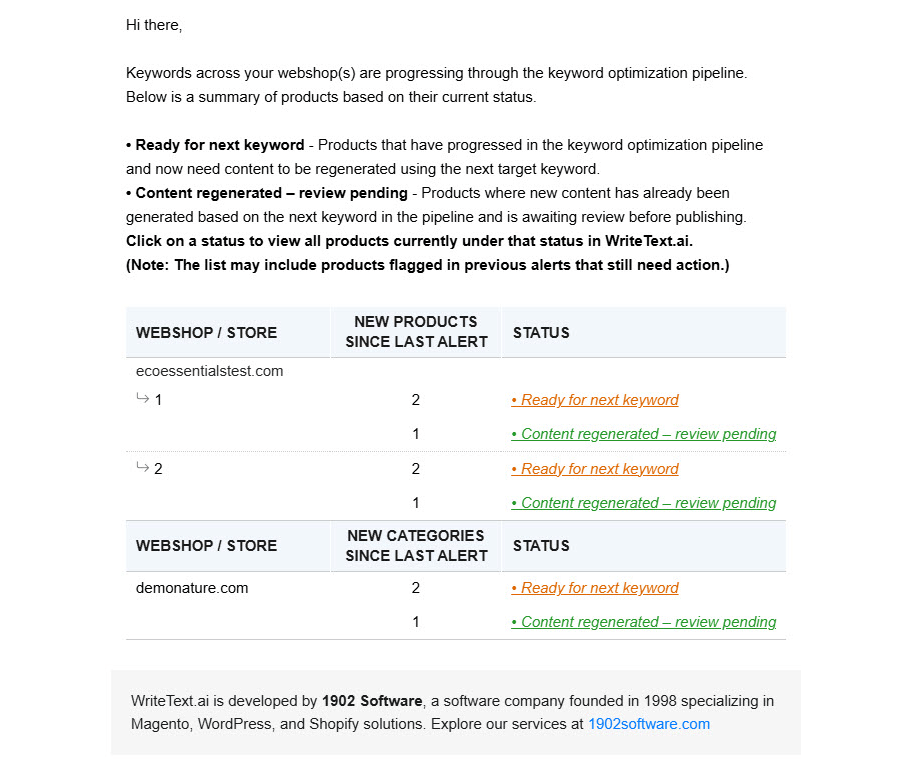
The outcome
Within a few months, your Bamboo Dish Brush starts ranking for keywords like "eco-friendly dish brush" and "biodegradable cleaning tools." Organic traffic increases, and your sustainable product line gains more visibility.
Visualize your SEO in the product grid
WriteText.ai displays columns in the product grid that give you a clear overview of your traffic potential and how many keywords you're optimizing for per page. Here, you can also filter by keyword status:
- With keyword analysis - All products where you have done AI-powered keyword analysis and currently have a keyword optimization pipeline. Within this selection, you can further filter products with:
- Keyword/s not applied in text - Products with keywords that are not yet applied in text.
- Keyword/s applied in text - Products with keywords that are applied in the generated text.
- Keyword/s applied in text and transferred to [platform] - Products with keywords that are used in the text transferred to your ecommerce platform, be it WooCommerce, Magento, or Shopify.
- No keyword analysis - All products where you have not done AI-powered keyword analysis yet, and currently do not have a keyword optimization pipeline.
Use cases: Who benefits from WriteText.ai?
WriteText.ai supports ecommerce stores of varying sizes and needs. The following examples show how different businesses use it:
- New ecommerce stores — Start keyword optimization from the point of setup. Automatically generate optimized content that targets the right keywords to get your products noticed.
- Established stores with large catalogs — Reduce the time spent on keyword optimization across large inventories by automating the process for hundreds or even thousands of products. Ensure your catalog stays updated and competitive.
- Seasonal products or promotions — Quickly optimize content for seasonal items, ensuring your pages rank when it matters most. Easily adapt keywords to fit changing trends or campaigns.
No matter the size of your catalog, WriteText.ai applies the same keyword optimization process consistently across your products.
Benefits of WriteText.ai
Here is what the keyword optimization features cover:
Save time
Automate keyword research, competitor analysis, and content updates.
Boost visibility
The keyword optimization pipeline progresses your content through keywords systematically, helping your store rank for targeted terms and drive more relevant traffic.
Stay competitive
Regular updates ensure your content adapts to search trends and remains relevant.
Scale with ease
Whether you're optimizing one product or thousands, WriteText.ai applies the same process regardless of catalog size.
Improve conversions
Align your product descriptions with search intent, ensuring your audience finds exactly what they're looking for.